OAuth 2.0
Kukuruku provides external authentication/authorization using the OAuth 2.0 protocol for integrated server-side and client-side applications.
We support two protocol flows:
- The traditional one for server-side applications (token retrieval using CLIENT SECRET and an AUTHORIZATION CODE issued by the authorization server).
- For fully client-side applications, where securely storing a CLIENT SECRET is not possible, the PKCE (Proof Key for Code Exchange) mechanism introduces an additional verification step for token retrieval.
More details: Which OAuth 2.0 Flow Should I Use?
Confidential Clients
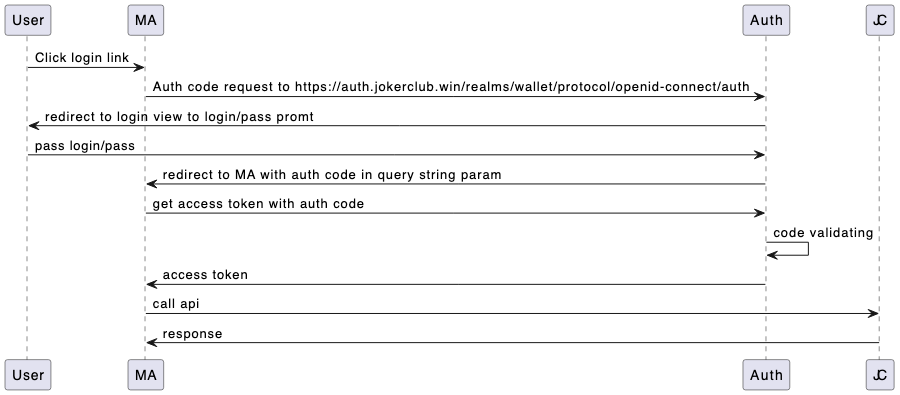
-
Redirect to login GET
/realms/public/protocol/openid-connect/auth
Redirect from the merchant's target page to kukuruku.'s authorization server login page to request client credentials and subsequently issue an Authorization Code.
After successful authentication, the user will be redirected back to the target page, and the Authorization Code will be passed via GET parameters.
Example redirect URL:
https://merchant1.kukuruku.win/process-login?session_state=69eaf4bf-58da-45e7-8ae7-92e6155e1ff8&iss=https%3A%2F%2Fqa-auth.kukuruku.win%2Frealms%2Fwallet&code=c2a6dbb6-0640-4358-a047-8f87bde1d0ab.69eaf4bf-58da-45e7-8ae7-92e6155e1ff8.13ca580d-5bb9-4258-b25d-778af22970b1
The received code will be used in the token request step.
Example URI
GET {auth_url}/realms/public/protocol/openid-connect/auth
URI Parameters
client_id — string (required), example: oauth2
Client ID issued during integration.
redirect_uri — string (required), example: https://merchant1.kukuruku.win/process-login
The redirect URI of the target application.
response_type — string (required), example: code
The type of credentials expected in the response. In this case, should be code.
The retrieved access token contains user info - confirmed email and confirmed phone number (if any)
-
Retrieve access token POST
/realms/public/protocol/openid-connect/token
Example URI
POST {auth_url}/realms/public/protocol/openid-connect/token
Request
Response 200
Public Clients
The first step is similar to the first step of the Authorization Code Flow, except that you must first generate a random string (CODE VERIFIER), generate a signature (CODE CHALLENGE) using the default algorithm - SHA-256, and pass code_challenge_method and code_challenge as GET parameters. The result will be an Authorization code passed via GET parameters during the redirect back to the target page.
-
Redirect to Login GET
/realms/public/protocol/openid-connect/auth
Redirect from the merchant’s target page to the KukurukuID authorization server login page to request the client’s login/password and subsequently issue an Authorization code.
Example URI
GET {auth_url}/realms/public/protocol/openid-connect/auth
URI Parameters
client_id — string, example: oauth2
Client identifier issued during integration.
redirect_uri — string, example: https://merchant1.kukuruku.win/process-login
The final application address.
response_type — string, example: code
The type of credentials Auth0 will return. In this case, the value must be code.
code_challenge_method — string, example: S256
The algorithm used for signing.
code_challenge — string, example: r3dEbfPwaW0bSyx_UnRXlLo_i2ShN0iWZDSERIyRcFg
The signature.
Upon successful authentication, the client will be redirected back to the target page, and the Authorization code will be passed as GET parameters.
Example redirect URL:
https://merchant1.kukuruku.win/process-login?session_state=69eaf4bf-58da-45e7-8ae7-92e6155e1ff8&iss=https%3A%2F%2Fqa-auth.kukuruku.win%2Frealms%2Fwallet&code=c2a6dbb6-0640-4358-a047-8f87bde1d0ab.69eaf4bf-58da-45e7-8ae7-92e6155e1ff8.13ca580d-5bb9-4258-b25d-778af22970b1.
The received code will be used in the next step to request tokens.
-
Obtain Access Token POST
/realms/public/protocol/openid-connect/token
In the second step, you must send the original string - CODE VERIFIER - along with the AUTHORIZATION CODE received in the first step via POST. The authorization server hashes the string using the specified algorithm and compares it with the CODE CHALLENGE provided in the first step, thereby verifying the request.
More info:
Authorization Code Flow with Proof Key for Code Exchange (PKCE)
Add Login Using the Authorization Code Flow with PKCE
Example URI
POST/realms/public/protocol/openid-connect/token
Request
Response 200